
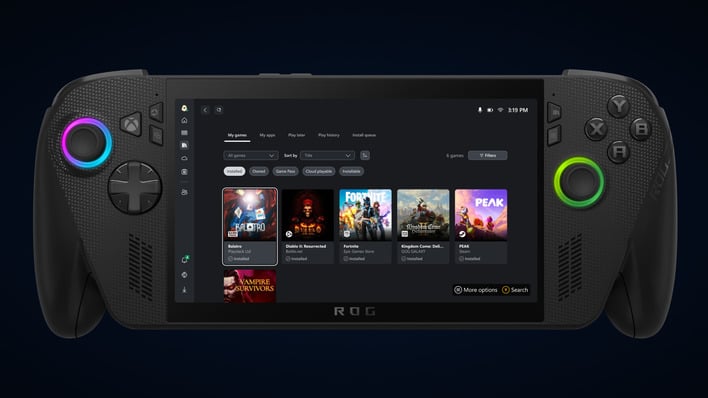
The Exciting New Upgrades Coming to the Xbox App for Windows
Microsoft is gearing up to enhance the Xbox App for Windows devices, aiming to provide a more integrated and user-friendly gaming experience for PC gamers. With a focus on convenience and accessibility, the upcoming changes promise to make a significant impact on how games are accessed and played on Windows platforms. Let’s dive into what these updates entail.
Aggregated Game Library
One of the standout features of the upcoming update is the introduction of an aggregated game library. This new functionality will allow gamers to view all their installed games—regardless of where they were purchased—within a single interface. Whether from the Xbox library, Xbox Game Pass, Battle.net, or other significant storefronts, players can now enjoy a unified view of their gaming options.
This new feature is not just a minor enhancement; it represents a broader shift towards providing a more seamless gaming experience. With the rise of handheld devices, the ability to quickly navigate and access all games from one location helps reduce the hassle of jumping between different apps when you want to dive into a gaming session.
Enhancements for Upcoming Handhelds
The timing of these updates is particularly strategic, as Microsoft is positioning itself to compete with upcoming handheld consoles like the Asus ROG Xbox Ally. By streamlining access to various games and storefronts, the Xbox App aims to deliver a richer gaming experience on these devices.
Given the popularity of handheld gaming, especially with competitors like the Steam Deck dominating the market, Microsoft’s focus on integration could provide a significant advantage. Players will appreciate the ability to launch games without the cumbersome task of switching apps, making every session smoother and more enjoyable.
Introduction of My Apps Feature
Another exciting addition is the My Apps feature. This will allow users to install and manage additional storefronts or utility apps that aren’t integrated into the official Xbox App experience. Think web browsers, productivity tools, or any other applications that make a gaming environment more efficient.
This feature is particularly useful for gamers who prefer to keep their gaming and browsing experiences within one ecosystem. For handhelds running Windows, where navigation control options may be limited, having everything integrated can drastically enhance usability. It’s a thoughtful response to the challenges faced while using devices that lack features common in other handhelds, like touchpads for easy navigation.
Cloud Gaming on Windows
In addition to these significant upgrades, Microsoft is also set to introduce support for cloud gaming later this month. This addition is a game changer, especially for handheld users who may find their devices lacking the power needed to run the latest titles effectively.
Cloud streaming enables players to access games without needing to download them directly onto their devices, which can conserve valuable storage space. For those with subscriptions to cloud gaming services, this feature can transform how and when they play, allowing for flexibility in accessing a broader range of games without the concern of performance limitations associated with hardware.
Conclusion: A New Era for Xbox Gaming on PC
As Microsoft continues to roll out these exciting updates, the Xbox App on Windows is becoming a more versatile tool for gamers. With features like the aggregated game library, My Apps, and cloud gaming support, users can look forward to a gaming experience that is not only more convenient but also tailored for the growing handheld gaming market. The way we access and enjoy games is evolving, and Microsoft is keen to be at the forefront.